Computing Watersheds 2D
Lets you compute a Watershed segmentation, in which the labeled objects in the selected multi-ROI will be used as the seed points and the expanded components will then be overwritten into the initial multi-ROI.
You should note that when you select Compute Watershed 2D, you will be prompted to select a dataset as the landscape image, which will be used to compute a Sobel. You should also note that the selected multi-ROI needs to provide enough information for the seed points to prevent bleeding from one region to another.
 How to Compute a Watershed 2D
- Make sure that the multi-ROI you plan to use as the seed points can provide enough information to prevent bleeding from one labeled component to another.
- Right-click the required multi-ROI and then choose Compute Watershed 2D in the pop-up menu.
- Choose the dataset that will provide the local topography for the Watershed algorithm in the Choose the Dataset to Compute a Sobel dialog, as shown below.
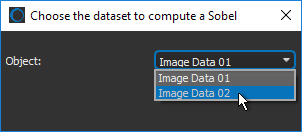
- Click OK.
The Watershed is evaluated with the labeled components in the multi-ROI as the seeds and the computed Sobel image of the selected dataset as the landscape image.
Wait for the expansion of the labeled objects to be computed and then overwritten into the initial multi-ROI.


